

Results, Evidence & Reports
Every completed check is stored as a Validation Result — including the registry’s raw response — so you can always prove what was checked, when, against which source, and what came back. Results are the artifact you show an auditor.
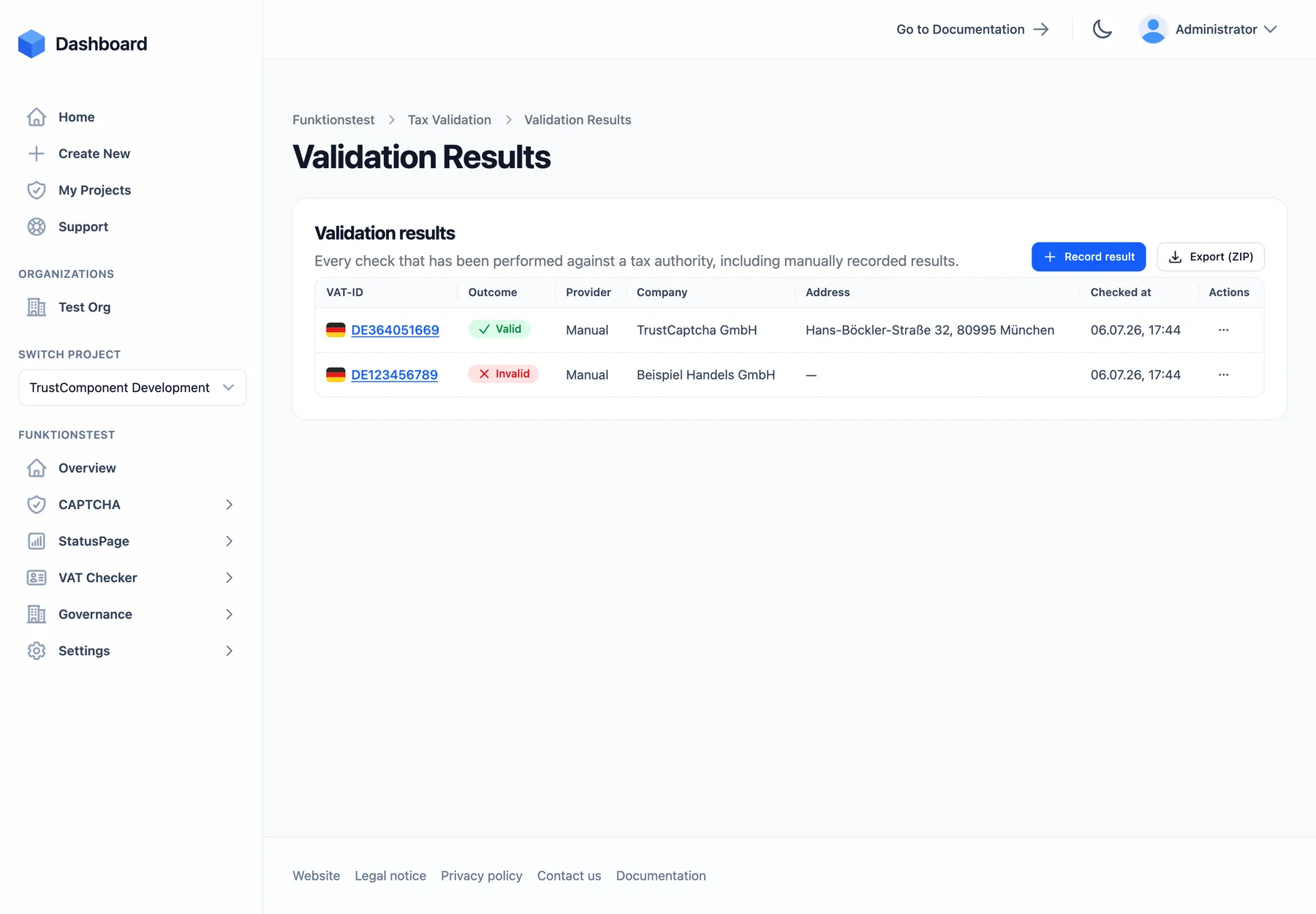
Browse them under VAT Checker → Validation Results, or per ID from Tax Identifiers.
Anatomy of a result
Section titled “Anatomy of a result”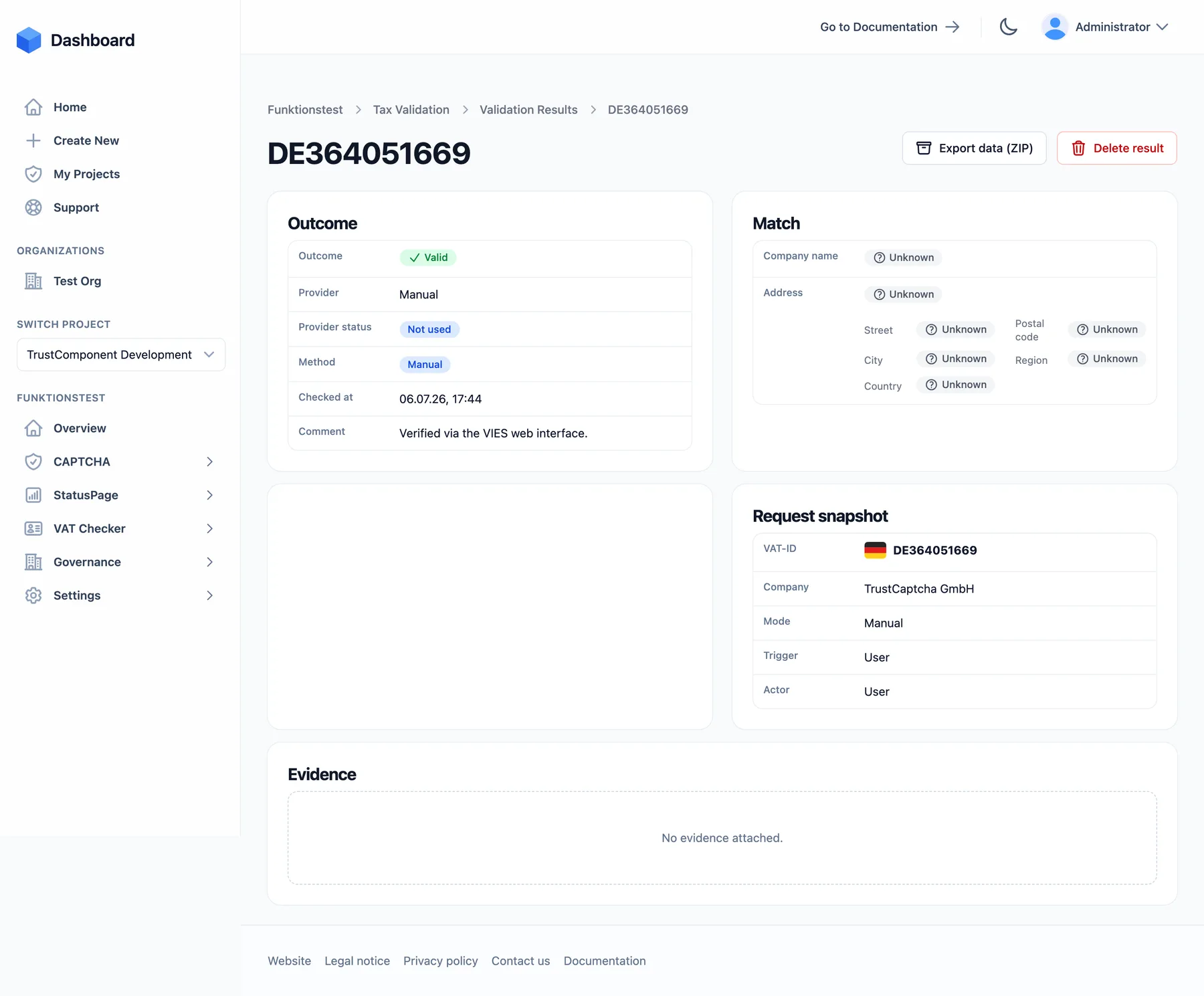
| Section | Contents |
|---|---|
| Outcome | The outcome, the provider that answered, the technical provider status, the verification method (Automatic or Manual), the checked at timestamp, and any reviewer comment |
| Match | The match verdicts for company name, overall address, and each address field |
| Provider response | What the registry returned: company, address, a source reference (e.g. the VIES consultation number), and any provider message |
| Request snapshot | A frozen copy of the original request — input values, mode, trigger (User / API / Schedule / System), the actor (which user, API key, or schedule), idempotency key, correlation ID |
| Evidence | Attached files and the raw registry response |
Because the result embeds the full request snapshot, it stands on its own — even after the request is gone and even if the identifier’s name changes later.
Raw registry response
Section titled “Raw registry response”For every automatic check, the exact response body the registry sent (JSON or XML) is archived, encrypted at rest, and downloadable from the result’s detail page via Raw response. This is your strongest evidence: not our interpretation of the registry, but the registry’s own words.
Evidence
Section titled “Evidence”Beyond the raw response, results can carry evidence attachments — e.g. a screenshot of the registry website for a manual review, or an official confirmation letter.
- Supported types: PDF, PNG, JPEG, GIF, WebP, TIFF, HTML, XML, TXT, JSON
- Max. 10 MB per file; total evidence storage is a plan quota
- Files are stored encrypted; each attachment records who uploaded it and an optional description
- Upload and delete via the API; the dashboard lists and downloads attachments on the result’s detail page
Exports & reports
Section titled “Exports & reports”All exports are a plan feature and available to every role from viewer up.
Per-result report — Export data (ZIP) on a result:
| File | Contents |
|---|---|
report.pdf | A formatted, human-readable report of the check |
report.json | The same data machine-readable, with an embedded SHA-256 of its canonical content |
raw-response.* | The registry’s original response |
evidence/… | Every attached evidence file |
manifest.json | SHA-256 checksum and size of every file in the bundle, plus the bundle timestamp |
The checksums let an auditor verify that every file still matches the export. They are checksums, not a signature: they reveal damaged or swapped files, but not a file that was changed together with its checksum — so keep the original ZIP. The SHA-256 of each registry response is also stored with the result in TrustComponent at the time of the check, so a fresh export can be compared against it at any time.
Per-identifier report — Export data (ZIP) on a tax identifier: the same bundle, combined across all checks of that ID.
Bulk export — Export (ZIP) on the results list: all results as CSV, JSON, and Excel (XLSX) in one archive, with one row per result (ID, timestamps, outcome, provider, provider status, method, scheme, country, normalized value, company, comment). Via the API the export can be filtered by date range, outcome, and provider.
Deleting results
Section titled “Deleting results”- Delete a single result from its detail page or the list — this permanently removes the result and its stored files (evidence and raw response).
- Delete a tax identifier to remove its entire history at once (requires typing the ID to confirm).
Deleting requires the member or admin role.
Data retention
Section titled “Data retention”How long results are kept is defined by your plan: 1 day on Free, 30 days on Solo, 1 year on Team and 2 years on Enterprise. A daily cleanup permanently deletes results older than your retention window, including their evidence and raw responses. When an identifier’s last result expires, the identifier and its schedules are removed as well.

